Identity document OCR converts information from passports, national identity cards, driver’s licenses, and residence permits into structured data. It reduces manual entry, accelerates customer onboarding, and helps businesses create consistent digital identity records.
However, extracting readable text is only the first step. Fraudulent, expired, or internally inconsistent documents may still produce accurate OCR results. Businesses must therefore validate the extracted fields against document rules, machine-readable data, user-provided information, and other verification signals.
What Is Identity Document OCR?
Identity document OCR identifies text and data fields within a document image and converts them into a machine-readable format.
Unlike general-purpose OCR, identity document OCR must understand document layouts. It should distinguish a surname from a given name, identify which date represents birth or expiration, and recognize document-specific elements such as machine-readable zones and barcodes.
A typical process includes:
- Detecting and classifying the document
- Locating relevant fields
- Extracting text and numbers
- Normalizing dates, names, and codes
- Returning structured results
- Validating the extracted information
Document classification is particularly important. The same value may have different meanings depending on the country, document type, version, and issuing authority.
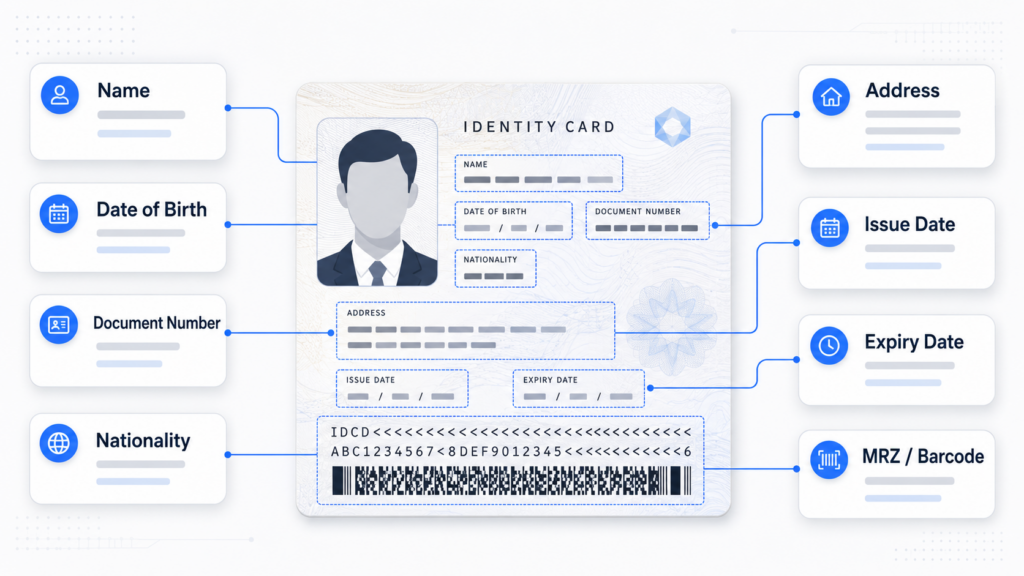
Common OCR Fields on Identity Documents
The exact fields vary across documents and markets, but most identity verification workflows require several common categories.
Full Name
Identity documents may separate the holder’s name into:
- Surname or family name
- Given name
- Middle name
- Full display name
Businesses should preserve both the original extracted value and a normalized version. Name order, spacing, accents, hyphens, and transliteration can vary significantly across languages.
Validation should account for legitimate formatting differences rather than expecting exact character-by-character matches.
Date of Birth
Date of birth supports identity confirmation, age checks, and eligibility rules.
OCR should distinguish the date of birth from issue and expiration dates. The extracted date should be converted into a consistent internal format while retaining the original document value.
Basic validation can identify impossible dates, future birth dates, or ages inconsistent with product requirements.
Document Number
The document number is one of the most important identity fields. Depending on the credential, it may be called an ID number, passport number, license number, or permit number.
Validation may include:
- Expected length
- Allowed characters
- Country-specific format
- Check digits
- Consistency across document sides
- Consistency with MRZ or barcode data
Businesses should avoid assuming that every visible number is the primary document number.
Document Type
The system should identify whether the credential is a passport, national ID card, driver’s license, residence permit, or another supported document.
This classification determines which fields should exist, where they should appear, and which validation rules should be applied.
Issuing Country and Nationality
The issuing country identifies the authority responsible for the document. Nationality identifies the holder’s citizenship as represented on the credential.
These fields are not always identical. Confusing them can create errors in customer profiles, compliance checks, or market-specific workflows.
Sex or Gender Marker
Some identity documents include a sex or gender marker. Values and formats differ by jurisdiction and document version.
Businesses should extract this field only when it has a defined operational or regulatory purpose. It should not be used as an indirect method of confirming facial identity.
Address
National IDs and driver’s licenses may contain a residential address. Passports generally do not.
Address extraction may involve multiple lines, postal codes, regions, cities, and local-language structures. Businesses should preserve the original text before applying normalization or splitting it into structured components.
Issue and Expiration Dates
The issue date indicates when the document became valid, while the expiration date determines whether it remains acceptable.
Validation should check:
- Whether the document has expired
- Whether the issue date precedes the expiration date
- Whether either date is implausible
- Whether visible dates match encoded data
- Whether the remaining validity meets business rules
Some documents have no expiration date, so validation rules must reflect the relevant credential type.
Issuing Authority
The issuing authority may help confirm the document’s origin and format. This field can be useful when multiple national or regional authorities issue similar credentials.
Machine-Readable Data
Passports and some identity cards contain a machine-readable zone, commonly known as an MRZ. Other documents may use PDF417 barcodes, QR codes, or embedded chip data.
Machine-readable elements can contain names, document numbers, dates, nationality codes, and check digits. Comparing them with visible fields provides an important consistency layer.
Extraction Is Not the Same as Validation
OCR answers:
“What information is visible on this document?”
Validation asks:
“Is the information plausible, consistent, and supported by the document?”
A digitally edited ID can still contain perfectly readable text. OCR may accurately extract a fraudulent name or altered date without identifying that the field was manipulated.
Businesses should separate OCR confidence from document trust. A high-confidence extraction means the text was read clearly; it does not prove the document is authentic.
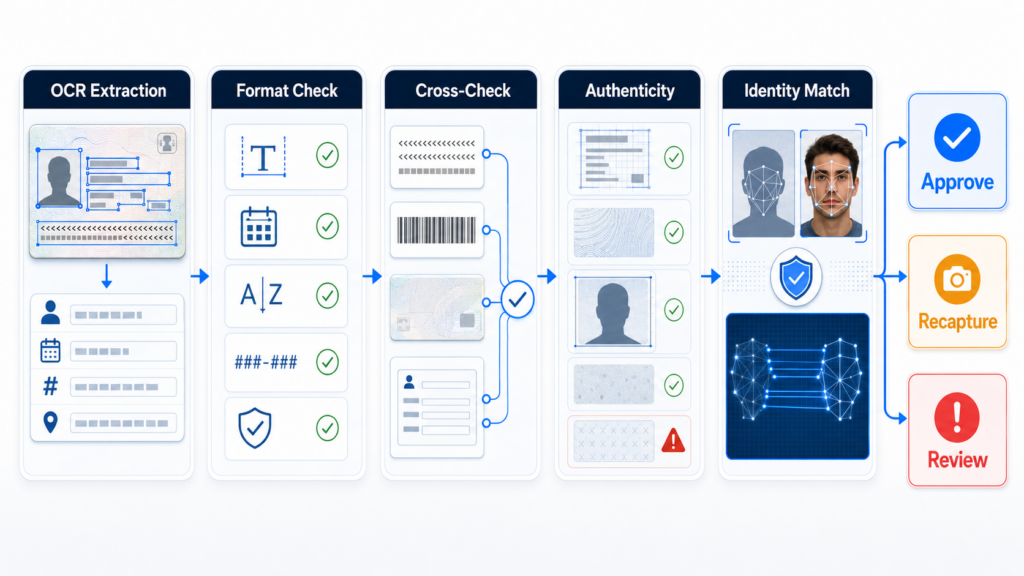
How Businesses Should Validate OCR Results
Validate Field Formats
Each document template may define expected field lengths, character sets, date structures, and numbering rules. Values outside these rules should generate a risk signal.
Compare Visible and Encoded Data
Where available, businesses should compare visual fields with MRZ, barcode, QR code, or chip data.
Differences in names, dates, or document numbers may indicate OCR error, document damage, or manipulation.
Compare Front and Back
For two-sided documents, data may appear on both sides or be repeated in encoded form. Cross-side validation helps detect mixed documents, substituted images, and inconsistent records.
Compare with User Input
OCR results should be checked against the information submitted in the onboarding form. Minor differences may result from formatting or transliteration, while major discrepancies may require correction or review.
Check Document Validity
The system should confirm that required fields are present and that the document is not expired, unsupported, or outside accepted validity rules.
Evaluate Visual Authenticity
Document analysis should examine layout, fonts, portraits, security patterns, image editing, screenshots, printouts, and recapture indicators.
This prevents readable but fraudulent fields from being accepted solely because OCR succeeded.
Connect the Document to the User
Face verification can compare the person completing the process with the portrait on the identity document. Liveness detection helps establish that the current facial input comes from a real person rather than a photograph, replay, deepfake, or manipulated stream.
Managing OCR Confidence and Exceptions
Field-level confidence scores can help businesses distinguish clear extractions from uncertain results. Low-confidence fields should not always cause immediate rejection.
A practical workflow may:
- Ask the user to recapture the document
- Allow the user to confirm extracted information
- Apply alternative parsing rules
- Request another supported document
- Route the case to manual review
Different fields should also have different importance. A low-confidence issuing-authority field may carry less risk than an uncertain document number or date of birth.
Data Minimization and Security
Businesses should extract only the fields required for defined onboarding, compliance, or fraud-prevention purposes.
Identity data should be encrypted, access-controlled, retained according to policy, and protected throughout processing. Raw document images and biometric data require particularly strong governance because they contain information that cannot be easily changed after exposure.
Conclusion
Identity document OCR can accelerate onboarding by converting document content into structured customer data. The most common fields include names, dates, document numbers, document type, issuing country, nationality, address, issuing authority, and machine-readable information.
Reliable eKYC requires more than accurate extraction. Businesses should validate formats, compare fields across document sources, confirm validity, analyze visual authenticity, and connect the document to a genuine live user. Combining OCR with document verification, face matching, liveness detection, and risk-based decisioning creates a stronger foundation for digital identity verification.