Remote onboarding has become the default user acquisition model for digital platforms. Whether a business operates in fintech, digital banking, online lending, mobility, gaming, social networking, or cross-border services, users now expect to open accounts, pass verification, and start using services without visiting a physical branch or office.
This shift creates a clear business opportunity: platforms can reach more users, reduce operational friction, and scale across markets faster. But it also introduces a higher level of identity risk. When onboarding happens remotely, platforms cannot rely on face-to-face inspection, physical document handling, or in-person staff judgment. Instead, they need a digital verification flow that can confirm two fundamental questions:
Is the identity document genuine and valid?
Is the person presenting the document the legitimate holder?
This is where document verification and face verification work together. Document verification checks the authenticity and consistency of the identity document. Face verification compares the user’s live face with the portrait on the document. Combined with liveness detection and risk controls, these technologies help digital platforms build a secure, scalable, and user-friendly onboarding process.
Why Remote Onboarding Needs Layered Identity Verification
Remote onboarding is not just a digital version of offline registration. It changes the risk model.
In offline onboarding, staff may physically inspect the ID card, compare the user’s face with the document photo, and ask follow-up questions when something looks suspicious. In remote onboarding, fraudsters can exploit the lack of physical interaction by submitting manipulated documents, using stolen identity information, replaying images, or attempting to pass verification with someone else’s document.
Common fraud patterns include:
- Uploading forged or altered identity documents
- Using a real document that belongs to another person
- Re-photographing or screen-capturing an ID document
- Submitting low-quality or intentionally blurred document images
- Using printed photos, video replays, masks, or deepfake tools during face capture
- Creating multiple accounts with the same identity or device signals
A single verification layer is usually not enough to detect these risks. OCR can extract text from a document, but it may not confirm whether the document is authentic. Face comparison can detect whether two faces are similar, but it needs a trusted document portrait and a live user image. Liveness detection can reduce spoofing risk, but it becomes stronger when combined with document and face checks.
For this reason, modern digital platforms increasingly adopt a layered verification approach.
What Document Verification Does
Document verification is the first major layer in a remote onboarding flow. It focuses on checking the identity document submitted by the user, such as a national ID card, passport, driver’s license, or residence permit.
A robust document verification process typically includes three capabilities.
First, OCR extracts key information from the document image. This may include name, date of birth, ID number, nationality, expiration date, and other structured fields. OCR reduces manual input, improves user experience, and helps platforms standardize identity data.
Second, document authenticity checks assess whether the submitted document appears genuine. The system may analyze document layout, fonts, security patterns, photo area, edges, background texture, tampering traces, and image consistency. The goal is to detect signs of forgery, manipulation, screenshot submission, or re-captured documents.
Third, field-level consistency checks compare extracted information across different document zones. For example, the name, date of birth, document number, and expiration date may appear in multiple areas of the same document. If the visible text, machine-readable zone, barcode, or document structure contains inconsistent information, the application may require further review.
For digital platforms, document verification helps reduce both operational cost and identity fraud. It allows automated checks to handle standard cases while routing suspicious cases to manual review.
What Face Verification Does
Face verification answers a different but equally important question: does the person submitting the application match the person shown on the identity document?
In a typical onboarding flow, the user captures a selfie or short video after uploading an identity document. The system then compares the live face image with the portrait extracted from the document. This is commonly known as 1:1 face matching.
The value of face verification is straightforward. A fraudster may have access to someone else’s document image or personal information, but they should not be able to pass onboarding unless their live face matches the document holder.
Face verification is especially important for platforms with financial, compliance, trust, or safety requirements. In digital banking and lending, it helps prevent account opening with stolen identities. In mobility and logistics, it can help verify drivers, riders, or service providers. In social and online communities, it can reduce fake accounts and impersonation risk. In marketplaces, it can support seller verification and user trust.
However, face verification should not work alone. If a user presents a printed photo, video replay, or digitally injected face image, a simple face match may not be sufficient. That is why liveness detection is commonly added before or during face verification.
The Role of Liveness Detection
Liveness detection helps determine whether the face being captured belongs to a real, present person rather than a spoofing medium.
Fraudsters may attempt to bypass face verification using printed photos, screens, masks, pre-recorded videos, synthetic faces, or deepfake injection tools. Liveness detection is designed to identify these presentation and injection risks.
There are different approaches to liveness detection. Passive liveness can analyze the face capture process without asking users to perform complex actions. Active liveness may require users to blink, turn their head, follow prompts, or complete specific gestures. For many digital platforms, passive or low-friction liveness is preferred because it can reduce user drop-off while still improving fraud defense.
The best choice depends on the platform’s risk appetite, market, user profile, and regulatory expectations. A low-risk service may prefer a lightweight verification experience. A high-risk financial transaction may require stronger checks or step-up verification.
A Practical Remote Onboarding Flow
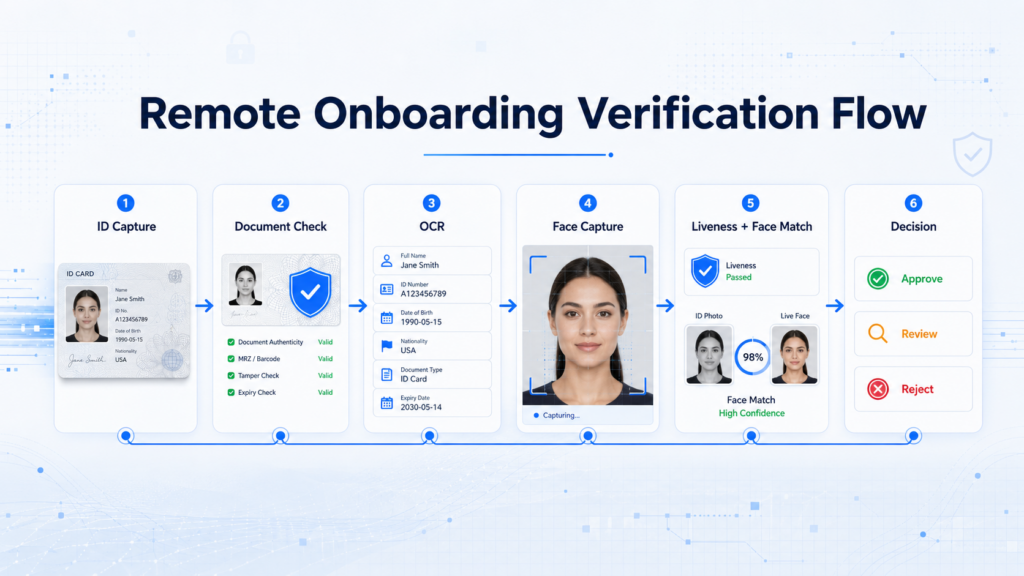
A practical document and face verification flow usually follows a clear sequence.
Step one: document capture. The user uploads or captures an image of their identity document. The system should guide the user to place the document within the frame, avoid glare, and ensure the image is clear.
Step two: OCR and document checks. The system extracts key identity fields and checks the document for authenticity, quality, validity, and consistency. Applications with unreadable, expired, manipulated, or suspicious documents can be rejected or routed to manual review.
Step three: face capture. The user takes a selfie or completes a short face capture process. The system checks image quality and ensures the face is visible, centered, and suitable for matching.
Step four: liveness detection. The system evaluates whether the captured face is from a live person. Suspicious cases, such as replay attacks or screen-based submissions, can be blocked or escalated.
Step five: face matching. The system compares the live face with the portrait from the identity document and generates a similarity score or match decision.
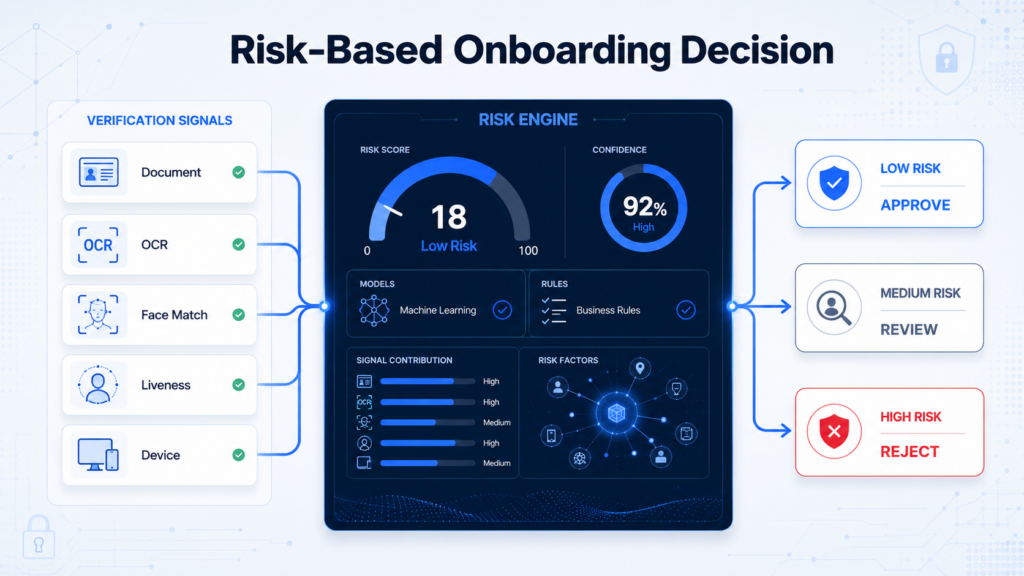
Step six: risk-based decisioning. The platform combines document results, face match score, liveness result, device signals, user behavior, and business rules to decide whether to approve, reject, or send the application to manual review.
This flow gives platforms more flexibility than a simple pass-or-fail model. Low-risk users can move through onboarding quickly, while suspicious applications receive additional scrutiny.
Key Metrics Platforms Should Monitor
To manage remote onboarding effectively, platforms should track both security and conversion metrics.
Important operational metrics include:
- Document capture success rate
- OCR extraction accuracy
- Face capture completion rate
- Face match pass rate
- Liveness pass rate
- Manual review rate
- Average onboarding time
- User drop-off by verification step
- Fraud detection rate
- False rejection rate
These metrics help product, risk, and operations teams identify where the onboarding flow creates friction. For example, a high document capture failure rate may indicate poor user guidance. A high manual review rate may suggest that rules are too strict or document quality thresholds need adjustment. A high drop-off rate during liveness detection may mean the user interaction is too complex.
The goal is not simply to add more checks. The goal is to balance security, compliance, and user conversion.
Best Practices for Digital Platforms
For platforms building or improving remote onboarding, several best practices can improve both risk control and user experience.
First, keep the user flow simple. Users should understand what document they need, how to capture it, and why face verification is required. Clear instructions reduce errors and drop-off.
Second, use real-time quality checks. Instead of letting users submit blurry or incomplete images, the system should detect poor quality immediately and ask users to recapture.
Third, combine document and face signals. Document verification confirms the identity source, while face verification confirms the person behind the application. These checks are stronger together.
Fourth, apply risk-based rules. Not every user needs the same level of friction. Low-risk users can be approved quickly, while high-risk users can trigger step-up checks or manual review.
Fifth, design for market coverage. Platforms operating across regions should consider local document types, languages, image quality conditions, device differences, and regulatory requirements.
Finally, continuously monitor fraud patterns. Identity fraud evolves quickly. A verification flow that works today may need adjustment as fraudsters adopt new tools and attack methods.
How Face++ Supports Remote Onboarding
Face++ provides identity verification capabilities that help digital platforms build secure and scalable remote onboarding flows. By combining document OCR, document verification, face comparison, and liveness detection, platforms can verify both the identity document and the real user behind the application.
For businesses expanding across digital markets, this layered approach can reduce manual workload, improve onboarding efficiency, and strengthen fraud prevention. It also gives teams the flexibility to design verification flows based on business risk, user experience goals, and compliance requirements.
Remote onboarding will continue to be a critical growth channel for digital platforms. As identity fraud becomes more sophisticated, platforms need verification systems that are accurate, adaptable, and user-friendly. Document and face verification provide the foundation for that system, helping businesses onboard legitimate users faster while keeping fraudulent activity under control.