Digital onboarding has become the primary customer acquisition channel for banks, fintech platforms, digital wallets, insurance providers, and other online services. Customers now expect to open an account, apply for credit, or access a digital service within minutes—without visiting a physical branch or completing complicated verification steps.
However, businesses still need to confirm that the person completing the onboarding process is a real, physically present individual rather than a printed photo, replayed video, digital mask, or manipulated facial image.
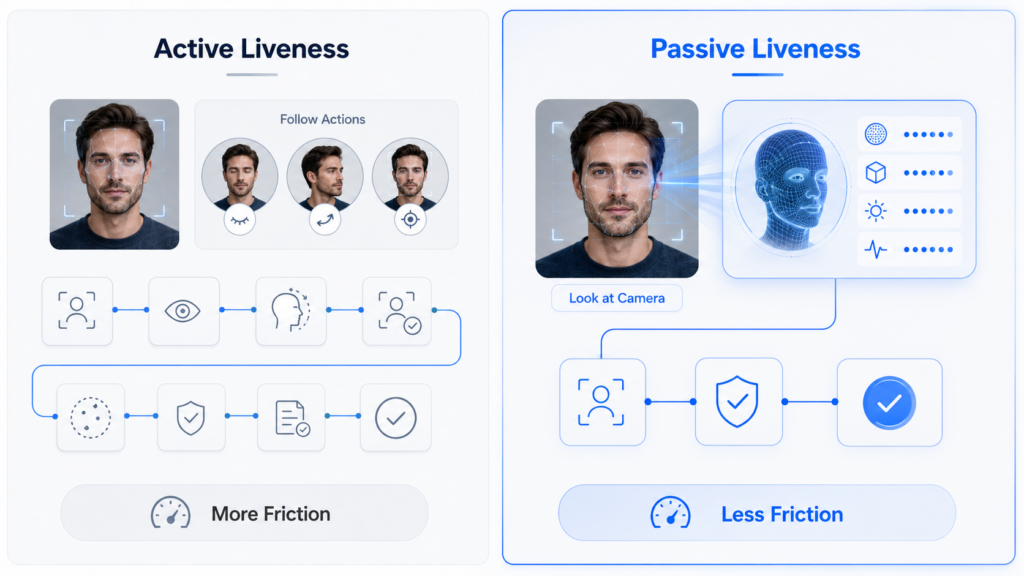
Liveness detection helps address this challenge. Yet traditional active liveness methods can introduce additional steps that disrupt the user journey. Asking customers to blink, turn their heads, read numbers, or follow on-screen instructions may increase abandonment, especially on mobile devices or in markets where network quality and digital literacy vary.
Passive liveness detection offers a more seamless alternative. It evaluates whether a real person is present without requiring the user to perform specific actions, helping businesses strengthen identity verification while reducing onboarding friction.
What Is Passive Liveness Detection?
Passive liveness detection is a facial anti-spoofing technology that determines whether the face presented to a camera belongs to a live person. The analysis usually takes place automatically during a selfie capture, video frame, or face verification session.
Unlike active liveness detection, passive liveness does not require users to complete challenge-based movements such as:
- Turning their head
- Blinking on command
- Smiling
- Opening their mouth
- Reading numbers aloud
- Following a moving object on the screen
Instead, the system analyzes visual and contextual signals contained within the captured facial image or short video sequence.
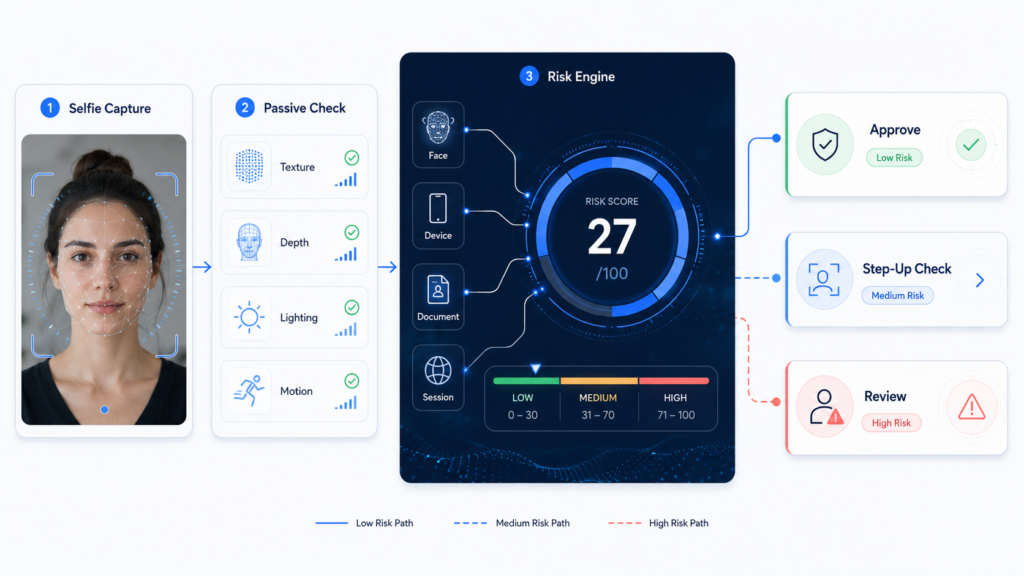
Depending on the implementation, these signals may include facial texture, depth-related characteristics, lighting consistency, image quality, screen artifacts, motion patterns, and signs of digital manipulation.
The user may simply look at the camera while the system performs liveness analysis in the background.
Why Onboarding Friction Matters
Every additional onboarding step creates an opportunity for users to abandon the process.
Customers may leave because instructions are unclear, the verification session takes too long, the camera repeatedly fails to capture an acceptable image, or the requested action feels inconvenient. Challenge-based liveness checks can be particularly difficult for users in low-light environments, users with accessibility needs, or customers using older mobile devices.
Friction can affect several business outcomes:
- Onboarding completion rates
- Customer acquisition costs
- Application processing time
- Manual review volumes
- Customer satisfaction
- Conversion from registration to activation
Businesses therefore face a difficult balance. Reducing verification controls may increase fraud exposure, while adding too many controls may negatively affect legitimate customers.
Passive liveness detection helps address this trade-off by embedding spoof detection into the normal face capture process.
How Passive Liveness Detection Works
A passive liveness system typically analyzes a captured selfie or a series of facial frames using computer vision and machine learning models.
The system looks for patterns that distinguish a live human face from common presentation and digital injection attacks.
Facial Texture Analysis
Printed photographs, images displayed on screens, and synthetic facial content often contain texture patterns that differ from natural skin.
A liveness model may analyze fine-grained visual information such as:
- Skin texture
- Moiré patterns
- Pixelation
- Printing artifacts
- Screen reflections
- Image compression
- Edge inconsistencies
These signals can help identify whether the camera is capturing a real face or a reproduced image.
Lighting and Reflection Analysis
Light interacts differently with three-dimensional facial surfaces than with flat photographs or digital displays.
Passive liveness systems may examine shadows, highlights, reflections, and brightness distribution across the face. Inconsistent lighting can indicate that the presented facial image originates from another surface or has been digitally manipulated.
Depth and Structural Signals
Some passive liveness solutions estimate three-dimensional facial characteristics from standard camera input. Others may use depth cameras or infrared sensors when supported by the device.
Depth-related analysis helps distinguish a real face from flat presentation attacks such as printed photos, screen replays, or cut-out masks.
Motion and Temporal Analysis
When several frames are available, the system can evaluate natural facial movement over time.
Small involuntary movements, changes in expression, and the relationship between the face and background can provide additional liveness evidence without requiring the user to perform a predefined challenge.
Attack Pattern Detection
Advanced systems may also detect attack-specific indicators associated with:
- Printed photos
- Video replays
- Screen-based attacks
- Two-dimensional masks
- Three-dimensional masks
- Face-swapping content
- Deepfake videos
- Virtual camera injection
Because attack methods continue to evolve, passive liveness models should be updated and tested against both presentation attacks and digitally injected content.
Reducing Friction During Digital Onboarding
Passive liveness detection can improve the onboarding experience in several ways.
Fewer User Instructions
Users do not need to understand or follow complex movement instructions. The verification interface can focus on basic positioning, lighting, and camera alignment.
This is especially valuable for businesses serving customers across multiple languages and digital literacy levels.
Faster Verification
Passive checks can run during the normal selfie capture process. Combining face capture, face matching, and liveness detection into a unified workflow reduces the number of separate screens and interactions.
A shorter process can improve completion rates while still maintaining identity assurance.
Better Mobile Experience
Mobile onboarding often takes place in uncontrolled environments. Customers may be outdoors, in moving vehicles, or using devices with different camera capabilities.
A well-designed passive liveness solution minimizes unnecessary interaction and allows the system to evaluate available signals automatically.
Improved Accessibility
Some users may find it difficult to perform specific facial movements or maintain precise positioning. Passive liveness can create a more inclusive verification experience by reducing dependence on challenge-based actions.
Lower Repeat Capture Rates
When liveness analysis is integrated with image quality checks, the system can provide immediate guidance when a face is blurred, obstructed, too dark, or outside the capture area.
Improving the first-time capture experience reduces repeated attempts and customer frustration.
Passive Liveness in an eKYC Workflow
Passive liveness detection is most effective when used as part of a layered identity verification process rather than as a standalone control.
A typical digital onboarding workflow may include:
- Identity document capture
The customer captures an identity document using a mobile or web camera. - OCR data extraction
The system extracts key information such as name, date of birth, document number, and expiration date. - Document verification
Document authenticity checks identify potential tampering, image manipulation, screen recapture, or invalid document characteristics. - Selfie capture
The customer provides a facial image with minimal interaction. - Passive liveness detection
The system evaluates whether the captured face belongs to a live person. - Face matching
The selfie is compared with the portrait extracted from the identity document. - Risk decisioning
Document, face, liveness, device, and behavioral signals are combined to approve, reject, or escalate the application.
This layered approach prevents businesses from relying on a single verification result. A live face alone does not prove that the person is using their own document, while a valid document does not confirm that the legitimate owner is present.
Passive and Active Liveness Should Not Be Treated as Opposites
Passive liveness is not necessarily a complete replacement for active liveness.
A risk-based strategy can use passive liveness as the default verification method for most onboarding sessions and introduce active challenges only when additional assurance is required.
For example, step-up verification may be triggered when the system detects:
- Suspicious device characteristics
- Multiple accounts linked to the same device
- Inconsistent identity information
- Low face-matching confidence
- Signs of camera injection
- High-risk geolocation or network activity
- Repeated failed verification attempts
This approach keeps the standard customer journey simple while applying stronger controls to higher-risk cases.
Key Considerations for Implementation
Businesses evaluating passive liveness detection should look beyond headline accuracy figures.
Attack Coverage
The solution should be tested against relevant attack types, including printed photos, screen replays, masks, deepfakes, and virtual camera injection.
Device Compatibility
Performance should remain consistent across different camera qualities, operating systems, browsers, and mobile device models.
User Environment
The system should handle realistic onboarding conditions such as variable lighting, background movement, glasses, head coverings, and different facial positions.
Demographic Performance
Testing should evaluate whether the system performs consistently across age groups, skin tones, genders, and geographic markets.
Integration Flexibility
Businesses may require mobile SDKs, web SDKs, APIs, private deployment, hybrid deployment, or regional data processing options.
Risk Orchestration
Liveness results should feed into a broader decision engine alongside document, device, behavioral, and transaction signals.
Building a Seamless and Secure Onboarding Experience
Customers should not have to choose between convenience and security.
Passive liveness detection enables businesses to perform facial anti-spoofing analysis within a simple selfie-based verification process. By reducing explicit user challenges, it can shorten onboarding journeys, improve accessibility, and lower unnecessary abandonment.
However, effective deployment requires more than adding a liveness score to an existing workflow. Businesses should combine passive liveness with document verification, face matching, device intelligence, behavioral analysis, and risk-based step-up controls.
Face++ provides facial recognition and liveness detection capabilities that can be integrated into digital identity verification workflows across mobile and web environments. By applying layered verification and adaptive risk decisioning, digital platforms can create onboarding experiences that remain smooth for legitimate customers while increasing resistance to identity fraud and spoofing attacks.