A failed document-verification result does not always mean that a customer submitted a fraudulent identity document. Verification can fail because the image is unclear, the document type is unsupported, data cannot be validated, the document appears manipulated, or the person presenting it cannot be reliably linked to the stated identity.
Digital platforms should distinguish between capture failure, inconclusive evidence, and suspected fraud. Treating every failure as fraud can increase false rejections, manual-review costs, and customer abandonment.
1. Poor Image Quality
The most common problems begin during document capture.
Verification may fail because of:
- Blur or camera movement
- Glare covering important fields
- Low resolution
- Strong shadows
- Overexposure or underexposure
- Cropped edges
- Finger or object obstruction
- Excessive perspective distortion
- A document that occupies too little of the image
OCR may misread characters, while authenticity analysis may lack sufficient detail to evaluate portrait boundaries, background patterns, or other document features.
A guided capture process should detect these problems early and request a specific correction rather than returning a generic failure.
2. Unsupported Document Type or Version
Identity documents vary by country, issuer, document type, and version. A verification system may recognize a passport but not a temporary identity certificate, older national ID, residence permit, or recently redesigned document.
Failure can also occur when:
- The wrong country or document type is selected
- The platform accepts only certain document versions
- The document layout has recently changed
- The submitted side does not contain the required fields
- The document language or script is not adequately supported
Businesses operating across markets should maintain clear acceptance policies and route unsupported but potentially legitimate documents to an alternative process.
3. Expired, Damaged, or Incomplete Documents
A document can be genuine but unsuitable for the current workflow.
Examples include:
- Expired documents
- Missing pages or required reverse side
- Cracked or peeling laminate
- Worn text or portrait regions
- Punched, clipped, or cancelled documents
- Missing signatures
- Damaged machine-readable zones
- Documents outside the platform’s permitted issuance period
NIST distinguishes authenticity, accuracy, and validity when assessing identity evidence. It also notes that organizations should define policies for handling expired evidence rather than assuming every expired document is automatically useless. pages.nist.gov
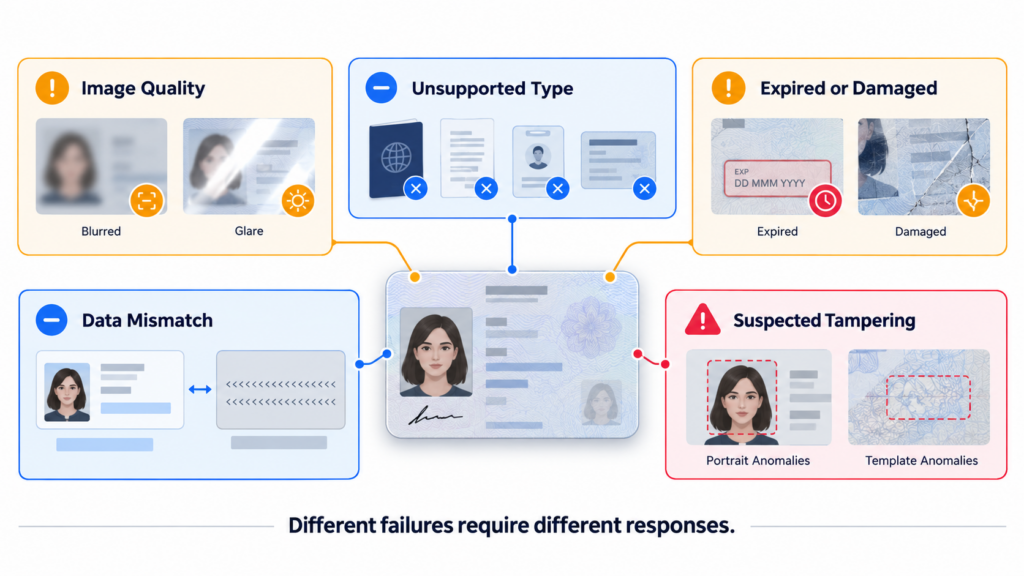
4. OCR and Data-Consistency Problems
Successful OCR is not the same as successful verification. OCR may extract visible text accurately even when the document is altered or counterfeit.
Verification can fail when:
- Printed fields contradict the machine-readable zone
- A barcode contains different identity data
- The document number has an invalid format
- Dates or check digits are inconsistent
- The name differs from the application
- Front-side and reverse-side data do not agree
- Transliteration or name order causes an apparent mismatch
Face++ OCR can support structured data extraction, but the resulting fields should be normalized and compared with encoded data, customer-provided information, and other trusted evidence.
5. Suspected Tampering or Counterfeit Evidence
A document may be readable and still fail authenticity analysis.
Potential indicators include:
- Replaced or edited portraits
- Inconsistent fonts or text alignment
- Interrupted background patterns
- Irregular portrait boundaries
- Copied templates
- Missing or misplaced document elements
- Different compression or noise across regions
- Visible-field and encoded-data disagreements
NIST states that evidence validation should confirm that evidence is in the correct format, contains complete information, shows no signs of counterfeiting or tampering, and includes appropriate physical or digital security features. pages.nist.gov
No individual anomaly should determine the outcome without considering document condition, capture quality, and supporting evidence.
6. Screenshots, Printouts, and Recaptured Documents
A platform may require a live capture of the original physical document. Verification can fail when the submitted image is:
- A screenshot
- A scan displayed on another screen
- A photocopy
- A printed digital image
- A cropped file from an online source
- A rephotographed manipulated document
Recapture can conceal editing traces and flatten document features. NIST describes live-capture techniques as a way to confirm that a document is physically present and that the submitted image is not merely a manipulated digital copy. pages.nist.gov
Capture integrity should therefore be evaluated separately from readability.
7. Chip, Barcode, or Source-Validation Failure
Where supported, verification may compare visible document information with a barcode, QR code, contactless chip, digital signature, or authoritative source.
Failure may result from:
- An unreadable or damaged chip
- Incorrect access-key data
- Invalid or unverifiable digital signatures
- Printed and chip data disagreement
- Unsupported chip or barcode formats
- Issuer-service unavailability
- A document reported lost, stolen, or cancelled
ICAO Doc 9303 covers machine-readable travel-document specifications and security mechanisms, although the checks available to a remote platform depend on the document, capture channel, device, and access to trusted sources. icao.int
A technical read failure should be distinguished from a confirmed authenticity failure.
8. Face-Match or Liveness Failure
A genuine document may still be presented by the wrong person. Document verification should therefore evaluate both the evidence and its holder.
The biometric stage may fail because of:
- The current face does not match the document portrait
- The document portrait is too small or degraded
- The user’s face is partially obstructed
- Pose, lighting, or capture quality is insufficient
- A printed photo, replay, mask, or deepfake is detected
- Media is injected through an untrusted capture path
- The comparison score falls into an uncertain range
Face++ face comparison can help determine whether the current user matches the document portrait, while liveness detection helps assess genuine presence. These checks complement document authenticity analysis rather than replace it. FacePP’s Prod Blog
9. Workflow and Policy Configuration Issues
Verification outcomes also depend on how the platform is configured.
Failure rates may increase when:
- Quality thresholds are too strict
- One policy is applied to every country
- New document versions are not added promptly
- OCR confidence is treated as authenticity
- Every mismatch causes immediate rejection
- Network errors are interpreted as fraud
- Users receive unclear recapture instructions
- No manual-review or exception path exists
Businesses should monitor failure reasons by country, document type, device, operating system, capture stage, and model version. This helps separate genuine fraud signals from product or configuration problems.
10. Responding to a Failed Verification
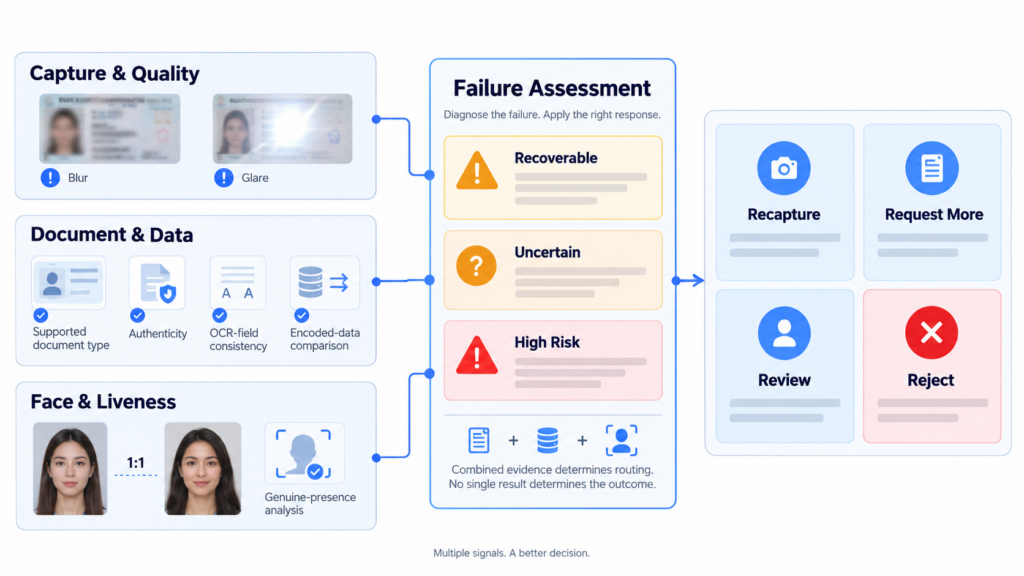
A risk-based workflow can route different failures appropriately:
- Poor capture: Request a guided recapture
- Missing evidence: Request the reverse side or another page
- Unsupported document: Offer an accepted alternative
- Technical failure: Retry the chip, barcode, or source check
- Uncertain data: Compare additional attributes
- Biometric uncertainty: Repeat face verification and liveness
- Suspicious evidence: Send for review
- Strong combined fraud signals: Reject or restrict
Face++ capabilities can support OCR, face comparison, liveness detection, and biometric identity binding within this workflow. The final decision should combine document, identity, device, session, and application-risk evidence.
11. Frequently Asked Questions
Q1. Does a failed document check mean the document is fake?
No. Capture quality, document support, damage, expired evidence, or technical errors can also cause failure.
Q2. Can a document pass OCR but fail verification?
Yes. OCR determines what text is visible. It does not independently prove that the document is authentic, valid, or owned by the applicant.
Q3. Why does Face++ face verification fail with a genuine document?
The portrait or live capture may be unclear, the face may be obstructed, or the similarity score may be below the configured threshold. A better capture may resolve the issue.
Q4. Should every failed verification be rejected?
No. Platforms should distinguish recoverable quality problems, unsupported evidence, uncertain results, and strong fraud indicators.
12. Turn Failures into Actionable Decisions
Document verification is a layered process, not a single pass-or-fail check. Failures can originate from capture quality, document support, authenticity, data consistency, source validation, face matching, liveness, or policy configuration.
By combining document analysis with Face++ OCR, face comparison, liveness detection, guided recapture, and contextual risk decisioning, digital platforms can reduce unnecessary rejection while escalating genuinely suspicious evidence.