Digital identity verification protects platforms from impersonation, document fraud, synthetic identities, and account abuse. However, poorly designed verification can also delay genuine customers, increase repeated submissions, and send too many applications to manual review.
The objective is not to remove verification controls. It is to identify avoidable friction, improve capture quality, and apply stronger checks only when the customer or event presents additional risk.
Face++ combines document processing, face comparison, liveness detection, facial-attack defense, and risk-based decisioning to help businesses create onboarding journeys that remain secure without treating every applicant as equally risky.
1. Poor Document Capture
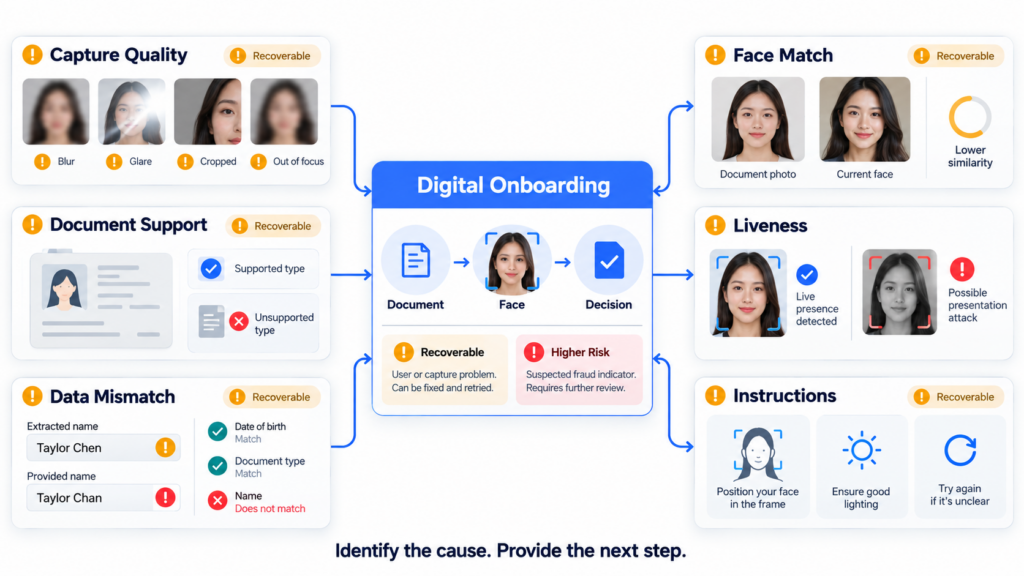
Blur, glare, cropped edges, shadows, low resolution, and perspective distortion can prevent accurate document processing.
When quality problems are identified only after submission, customers may wait for a result before being asked to repeat the capture. This creates unnecessary delay and abandonment.
A stronger capture experience provides immediate guidance for:
- Document positioning
- Edge visibility
- Focus and resolution
- Glare and reflection
- Lighting
- Front-and-back capture
- Supported document orientation
NIST notes that remote document-capture interfaces can use overlays and illumination checks to help applicants submit images with appropriate size and brightness. It also recommends allowing users to review OCR-populated information for accuracy. pages.nist.gov
Face++ uses multilingual guidance, image correction, and quality checks to reduce unusable document submissions before they reach downstream verification.
2. Unsupported Documents and Market Differences
Customers may submit a document type, version, language, or format that the onboarding platform does not support.
Global programs must manage differences across:
- Passports and national identity cards
- Driver’s licences and residence permits
- Physical and digital credentials
- Document versions
- Languages and scripts
- Date and name formats
- Country-specific acceptance policies
A generic “verification failed” message does not help the applicant correct the issue. The platform should explain whether the document is unsupported, expired, incomplete, or simply captured poorly.
Face++ supports global document recognition and multilingual extraction across diverse documents and markets, allowing businesses to maintain a common technical workflow while configuring local acceptance rules.
3. OCR Errors and Data Mismatches
OCR can reduce manual entry, but uncertain extraction may create friction when the platform treats every difference as fraud.
Common mismatch sources include:
- Transliteration differences
- Reordered names
- Missing diacritics
- Local and international date formats
- Address abbreviations
- MRZ truncation
- Customer typing errors
- Low-quality document images
The platform should distinguish low-confidence extraction from a material identity contradiction.
Customers can be allowed to review extracted information, while important fields such as name, date of birth, and document number receive stronger validation. Unresolved inconsistencies can trigger recapture or review instead of immediate rejection.
4. Repeated Face and Liveness Attempts
Face verification may fail because of:
- Poor lighting
- Extreme head pose
- Camera obstruction
- Motion blur
- Glasses, masks, or strong reflections
- Significant age differences
- Low-quality document portraits
- Network or capture interruption
A low face-comparison score does not automatically mean impersonation. Similarly, an incomplete liveness session may reflect user confusion rather than an attack.
Remote identity proofing requires both identity evidence and a current facial capture when the applicant is compared with the document holder. NIST also identifies liveness detection as an important control against spoofing and presentation attacks. pages.nist.gov
Face++ can combine 1:1 face comparison with liveness detection, helping platforms separate facial similarity from genuine presence.
5. Unclear Instructions and Error Messages
Customers may abandon onboarding when they do not understand:
- Which document to use
- Which side to capture
- Why camera permission is required
- How to position their face
- Whether the process has completed
- Why verification failed
- What they should do next
Instructions should appear immediately before the relevant action rather than being presented in one long introduction.
NIST recommends clearly labelled sequential steps, consistent navigation, visual guidance, and instructions delivered close to biometric capture.
Error messages should also be actionable. “Move away from glare” is more useful than “Capture failed,” while “This document type is unsupported” is more useful than “Verification rejected.”
6. Too Many Checks for Low-Risk Customers
Applying the maximum verification process to every applicant increases completion time and operational cost.
For example, requiring additional documents, repeated liveness checks, or manual review for a clear low-risk application may not add proportionate security.
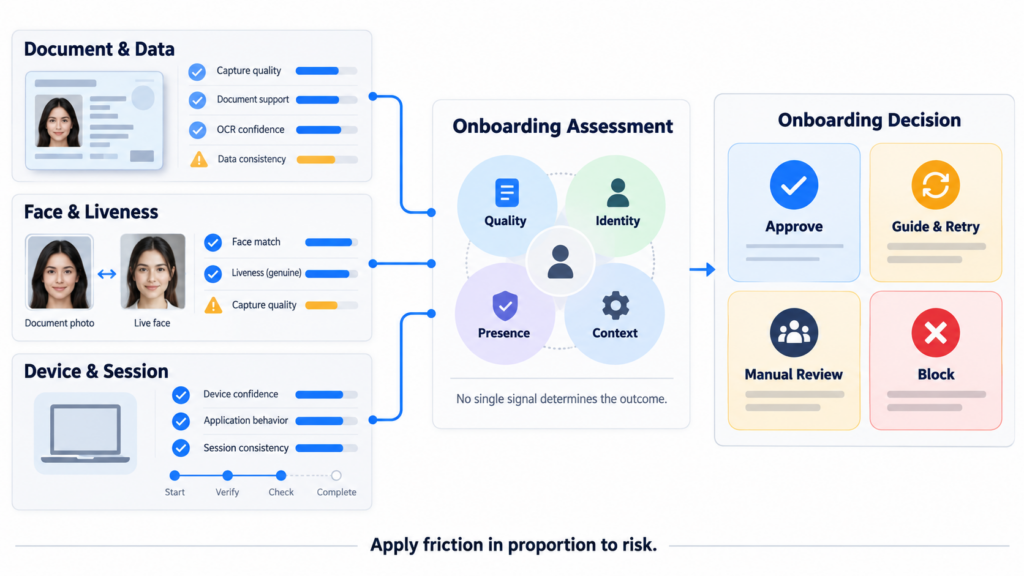
Risk-based onboarding can use:
- Document and data confidence
- Face comparison and liveness results
- Device and session evidence
- Duplicate identity indicators
- Customer type
- Product risk
- Market requirements
- Application behavior
Face++ supports configurable onboarding decisions so low-risk applicants can proceed, uncertain cases can provide more evidence, and high-risk sessions can receive stronger controls.
7. Excessive Manual Review
Manual review is necessary for complex or inconclusive cases, but routing too many applications to reviewers creates queues and inconsistent outcomes.
High review volumes may result from:
- Overly sensitive thresholds
- Weak capture guidance
- Unsupported documents
- Common-name screening alerts
- Unresolved OCR differences
- Missing field-level confidence
- Rules that do not distinguish quality issues from fraud
Straightforward applications should be automated where policy permits. Review teams can then focus on material conflicts, suspected manipulation, identity relationships, and higher-risk customers.
The review interface should present the original evidence, extracted fields, confidence scores, detected anomalies, and decision history in a clear sequence.
8. Accessibility and Device Limitations
Not every customer has a recent device, strong camera, stable connection, or quiet environment.
Onboarding may also be difficult for users with:
- Visual or motor impairments
- Limited digital experience
- Older cameras
- Slow networks
- Documents with worn surfaces
- Names or addresses that do not fit standard forms
A resilient workflow can provide alternative capture guidance, retry options, accessible instructions, saved progress, another supported document, assisted verification, or manual escalation.
Security controls should not assume that every legitimate user can complete the same interaction under identical conditions.
9. Measuring Onboarding Friction
Businesses should monitor the verification funnel rather than looking only at final approval rates.
Useful metrics include:
- Completion rate
- Abandonment by step
- Document recapture rate
- Face and liveness retry rate
- OCR correction rate
- Average decision time
- Manual-review rate
- False-rejection indicators
- Approval by document type, market, and device
- Fraud outcomes after approval
These metrics should be segmented carefully. A high retry rate for one document type may indicate a capture-design problem, while a sudden increase for one device group may indicate technical or fraud-related change.
10. Frequently Asked Questions
Q1. Does reducing onboarding friction weaken security?
Not necessarily. Real-time guidance, better data extraction, and risk-based routing can reduce unnecessary retries while preserving stronger controls for uncertain or high-risk cases.
Q2. What should happen after a failed document capture?
The platform should identify whether the cause is blur, glare, cropping, unsupported evidence, or a higher-risk anomaly and provide the appropriate next action.
Q3. How does Face++ reduce face-verification friction?
Face++ face comparison and liveness detection support automated identity matching and genuine-presence analysis. Quality controls and risk-based retry policies help avoid treating every uncertain result as fraud.
Q4. When is manual review appropriate?
Manual review is most useful when automated evidence remains incomplete, contradictory, or materially suspicious after reasonable recapture and validation steps.
11. Make Verification Proportionate and Recoverable
Digital onboarding friction often comes from unclear instructions, poor-quality capture, rigid rules, repeated checks, and undifferentiated failure handling.
By combining Face++ document processing, face comparison, liveness detection, facial-attack defense, and risk-based decisioning, businesses can move clear applications forward while providing recoverable paths for genuine customers who encounter quality or data issues.
The best onboarding journey is not the one with the fewest checks. It is the one that requests the right evidence, explains the next action, and applies friction in proportion to risk.