In digital onboarding, identity documents are one of the first checkpoints for verifying a user’s identity. Whether a customer is opening a bank account, registering for a fintech wallet, applying for a loan, or joining a digital platform, businesses often need to collect and process information from an ID card, passport, driver’s license, or other government-issued document.
Two terms often appear in this process: Identity Document OCR and Document Verification. They are closely related, but they are not the same thing.
OCR helps businesses read information from identity documents. Document verification helps businesses determine whether the document is authentic, valid, and suitable for identity verification. Understanding the difference is important for building a secure, compliant, and user-friendly onboarding flow.
What Is Identity Document OCR?
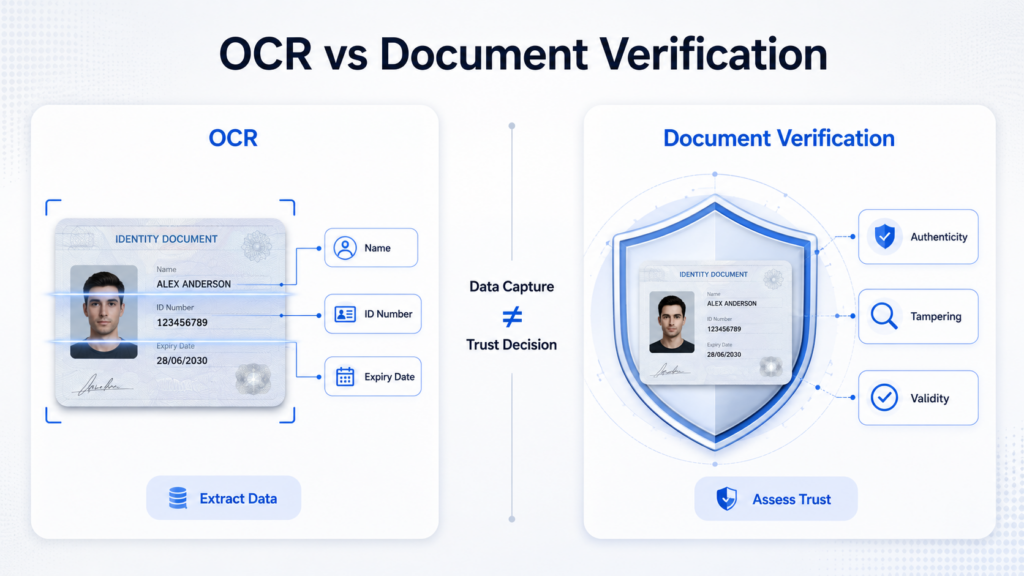
Identity Document OCR, or Optical Character Recognition, is the process of extracting text and structured data from an identity document image.
When a user uploads or captures a document, OCR technology identifies key fields such as:
- Full name
- Date of birth
- Document number
- Nationality
- Gender
- Expiry date
- Address
- MRZ code
- Issuing authority
The goal of OCR is to convert visual information into machine-readable data. Instead of asking users to manually type their name, ID number, or date of birth, OCR can automatically extract these fields from the document image.
This improves user experience and reduces input errors. For example, a digital wallet can use OCR to pre-fill registration forms. A lending platform can use OCR to quickly capture applicant information. A bank can use OCR to accelerate account opening while keeping the data structured for downstream compliance checks.
However, OCR mainly answers one question:
“What information is written on this document?”
It does not fully answer whether the document is real, valid, or trustworthy.
What Is Document Verification?
Document verification goes beyond text extraction. It is the process of checking whether an identity document is authentic, complete, and consistent.
A document verification system may analyze:
- Document layout and template
- Security features
- Fonts and field placement
- Image quality
- Signs of tampering
- Screenshot or photocopy risks
- Recaptured document images
- Expiry date and document validity
- MRZ consistency
- Cross-field consistency
- Face image quality on the document
The goal is to identify whether the submitted document can be trusted as part of an identity verification process.
For example, a fraudster may submit a digitally edited ID card with a modified name or date of birth. OCR may still read the text correctly, but document verification should detect abnormal patterns, layout inconsistencies, or manipulation traces.
Document verification mainly answers a broader question:
“Can this document be trusted?”
This makes it a critical layer in eKYC, fraud prevention, and regulated digital onboarding.
OCR vs Document Verification: The Core Difference
The core difference is simple:
OCR extracts data. Document verification evaluates trust.
OCR is focused on recognition and data capture. It helps businesses understand what is printed on the document.
Document verification is focused on risk detection and authenticity assessment. It helps businesses understand whether the document should be accepted, rejected, or sent for manual review.
In practice, OCR is often one component of document verification, but it is not a replacement for document verification.
A strong onboarding workflow usually needs both.
Why OCR Alone Is Not Enough
OCR can significantly improve efficiency, but relying on OCR alone creates risk.
First, OCR may correctly extract data from a fake or manipulated document. If a fraudster changes a document number or date of birth, OCR may still capture the edited text accurately. Accurate extraction does not mean the source is authentic.
Second, OCR does not always detect image source risk. A user may upload a screenshot, photocopy, scanned copy, or recaptured image instead of the original physical document. These cases may still be readable, but they may not meet a platform’s security requirements.
Third, OCR does not fully validate document logic. A document may contain inconsistent fields, abnormal expiry dates, mismatched MRZ data, or formatting that does not align with official templates. These issues require verification logic beyond basic text recognition.
For low-risk use cases, OCR may be enough for data entry automation. But for financial services, digital lending, e-wallets, online marketplaces, mobility platforms, and other trust-sensitive businesses, OCR alone is usually insufficient.
Why Document Verification Needs OCR
While OCR alone is not enough, document verification still depends heavily on OCR.
The extracted data provides the foundation for many downstream checks. For example, the system may compare the document number format against country-specific rules, validate the expiry date, check whether the MRZ matches the visual inspection zone, or compare extracted identity data with user-submitted information.
OCR also enables automation at scale. Without OCR, many verification workflows would require manual review, creating higher operating costs and slower onboarding.
In other words, OCR provides the structured data, while document verification applies risk logic and authenticity checks on top of that data.
How They Work Together in eKYC
In a typical eKYC workflow, OCR and document verification are used together with face verification and liveness detection.
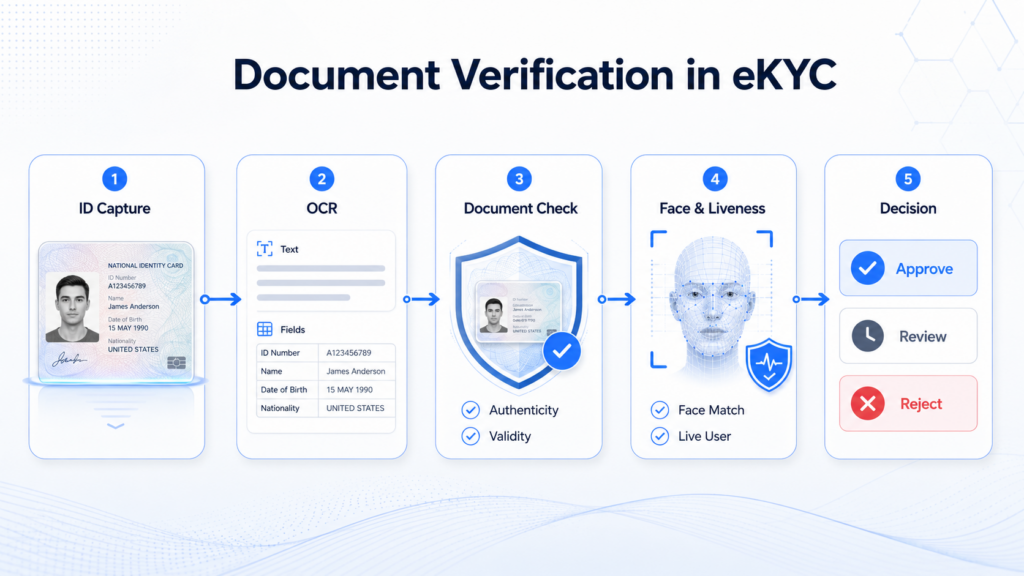
A simplified flow may look like this:
- The user captures an identity document.
- OCR extracts key identity fields.
- Document verification checks authenticity, quality, validity, and consistency.
- The user takes a selfie or video.
- Face verification compares the live face with the document portrait.
- Liveness detection checks whether the user is a real person present during the session.
- A risk engine makes the final decision: approve, review, or reject.
This layered approach helps businesses reduce friction for legitimate users while detecting higher-risk submissions more effectively.
For example, if a document is clear, authentic, unexpired, and consistent with the user’s face, the system can approve the onboarding flow automatically. If the document shows signs of tampering or poor image quality, the case can be rejected or routed to manual review.
Business Value of Combining OCR and Document Verification
Combining OCR with document verification delivers value across three areas.
First, it improves conversion. Users do not need to manually enter long identity numbers or personal details, which reduces friction during onboarding.
Second, it improves operational efficiency. Automated extraction and verification reduce the workload for manual review teams.
Third, it improves risk control. Businesses can detect manipulated documents, suspicious image sources, expired IDs, and inconsistent identity data before allowing account creation or high-risk transactions.
For enterprises operating across multiple markets, this is especially important. Identity documents vary by country, language, format, and security design. A scalable identity verification system must handle both data extraction and document authenticity checks across diverse document types.
When Should Businesses Use OCR, Document Verification, or Both?
Businesses should use OCR when the main goal is to extract identity data quickly and accurately. This is useful for form filling, user registration, data entry, and document digitization.
Businesses should use document verification when the goal is to assess whether the identity document is trustworthy. This is essential for eKYC, compliance, fraud prevention, account opening, lending, payment onboarding, and other regulated or risk-sensitive scenarios.
Most digital identity workflows should use both. OCR helps capture the data. Document verification helps determine whether the document can be trusted.
Final Takeaway
Identity Document OCR and Document Verification are connected, but they serve different purposes.
OCR reads the document. Document verification evaluates the document.
OCR improves speed and data accuracy. Document verification improves trust, security, and compliance.
For modern digital onboarding, the best practice is not to choose one over the other, but to combine them into a multi-layer identity verification workflow. By using OCR, document authenticity checks, face verification, liveness detection, and risk-based decisioning together, businesses can create a faster onboarding experience while reducing identity fraud risk.